jquery动感漂浮导航菜单代码分享
更新时间:2026-10-06 17:07:44作者:yezheng
这是一款基于jquery实现动感漂浮导航菜单的特效代码,菜单可以上下浮动,动感十足,为自己的网站增加了活力,是一款非常实用的导航菜单特效源码。
运行效果图:
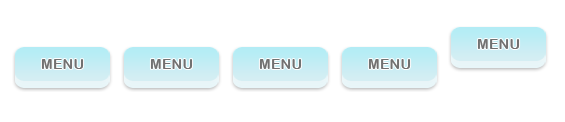
为大家分享的jquery动感漂浮导航菜单代码如下
<head>
<meta http-equiv="Content-Type" content="text/html; charset=utf-8">
<title>jQuery Floating Menu</title>
<script type="text/javascript" src="js/jquery-1.3.1.min.js"></script>
<script type="text/javascript" src="js/jquery.easing.1.3.js"></script>
<script>
$(document).ready(function () {
//get the default top value
var top_val = $('#menu li a').css('top');
//animate the selected menu item
$('#menu li.selected').children('a').stop().animate({top:0}, {easing: 'easeOutQuad', duration:500});
$('#menu li').hover(
function () {
//animate the menu item with 0 top value
$(this).children('a').stop().animate({top:0}, {easing: 'easeOutQuad', duration:500});
},
function () {
//set the position to default
$(this).children('a').stop().animate({top:top_val}, {easing: 'easeOutQuad', duration:500});
//always keep the previously selected item in fixed position
$('#menu li.selected').children('a').stop().animate({top:0}, {easing: 'easeOutQuad', duration:500});
}
);
});
</script>
<style>
#menu {
list-style:none;
padding:0;
margin:0 auto;;
height:70px;
width:600px;
}
#menu li {
float:left;
width:109px;
height:inherit;
position:relative;
overflow:hidden;
}
#menu li a {
position:absolute;
top:20px;
text-indent:-999em;
background:url(menu.png) no-repeat 0 0;
display:block;
width:109px;
height:inherit;
/* fast png fix for ie6 */
position:relative;
behavior: expression((this.runtimeStyle.behavior="none")&&(this.pngSet?this.pngSet=true:(this.nodeName == "IMG" && this.src.toLowerCase().indexOf('.png')>-1?(this.runtimeStyle.backgroundImage = "none",
this.runtimeStyle.filter = "progid:DXImageTransform.Microsoft.AlphaImageLoader(src='" + this.src + "', sizingMethod='image')",
this.src = "transparent.gif"):(this.origBg = this.origBg? this.origBg :this.currentStyle.backgroundImage.toString().replace('url("','').replace('")',''),
this.runtimeStyle.filter = "progid:DXImageTransform.Microsoft.AlphaImageLoader(src='" + this.origBg + "', sizingMethod='crop')",
this.runtimeStyle.backgroundImage = "none")),this.pngSet=true));
}
</style>
</head>
<body>
<br/><br/><br/>
<ul id="menu">
<li><a href="#">Item 1</a></li>
<li><a href="#">Item 2</a></li>
<li><a href="#">Item 3</a></li>
<li><a href="#">Item 4</a></li>
<li><a href="#">Item 5</a></li>
</ul>
<head>
<meta http-equiv="Content-Type" content="text/html; charset=utf-8">
<title>jQuery Floating Menu</title>
<script type="text/javascript" src="js/jquery-1.3.1.min.js"></script>
<script type="text/javascript" src="js/jquery.easing.1.3.js"></script>
<script>
$(document).ready(function () {
//get the default top value
var top_val = $('#menu li a').css('top');
//animate the selected menu item
$('#menu li.selected').children('a').stop().animate({top:0}, {easing: 'easeOutQuad', duration:500});
$('#menu li').hover(
function () {
//animate the menu item with 0 top value
$(this).children('a').stop().animate({top:0}, {easing: 'easeOutQuad', duration:500});
},
function () {
//set the position to default
$(this).children('a').stop().animate({top:top_val}, {easing: 'easeOutQuad', duration:500});
//always keep the previously selected item in fixed position
$('#menu li.selected').children('a').stop().animate({top:0}, {easing: 'easeOutQuad', duration:500});
}
);
});
</script>
<style>
#menu {
list-style:none;
padding:0;
margin:0 auto;;
height:70px;
width:600px;
}
#menu li {
float:left;
width:109px;
height:inherit;
position:relative;
overflow:hidden;
}
#menu li a {
position:absolute;
top:20px;
text-indent:-999em;
background:url(menu.png) no-repeat 0 0;
display:block;
width:109px;
height:inherit;
/* fast png fix for ie6 */
position:relative;
behavior: expression((this.runtimeStyle.behavior="none")&&(this.pngSet?this.pngSet=true:(this.nodeName == "IMG" && this.src.toLowerCase().indexOf('.png')>-1?(this.runtimeStyle.backgroundImage = "none",
this.runtimeStyle.filter = "progid:DXImageTransform.Microsoft.AlphaImageLoader(src='" + this.src + "', sizingMethod='image')",
this.src = "transparent.gif"):(this.origBg = this.origBg? this.origBg :this.currentStyle.backgroundImage.toString().replace('url("','').replace('")',''),
this.runtimeStyle.filter = "progid:DXImageTransform.Microsoft.AlphaImageLoader(src='" + this.origBg + "', sizingMethod='crop')",
this.runtimeStyle.backgroundImage = "none")),this.pngSet=true));
}
</style>
</head>
<body>
<br/><br/><br/>
<ul id="menu">
<li><a href="#">Item 1</a></li>
<li><a href="#">Item 2</a></li>
<li><a href="#">Item 3</a></li>
<li><a href="#">Item 4</a></li>
<li><a href="#">Item 5</a></li>
</ul>
以上就是为大家分享的jquery动感漂浮导航菜单代码,希望大家可以喜欢。