JS实现可关闭的对联广告效果代码
更新时间:2026-10-06 17:25:14作者:yezheng
本文实例讲述了JS实现可关闭的对联广告效果代码。分享给大家供大家参考。具体如下:
这是非常经典的一款对联广告代码,带有关闭按钮,用户可以自行关掉广告,另外,广告的垂直位置会随着滚动条的变化自动定位,也就是拖动浏览器滚动条的时候广告始终显示,不会被隐藏掉,现在很多网站都在用的对联广告代码。
运行效果截图如下:
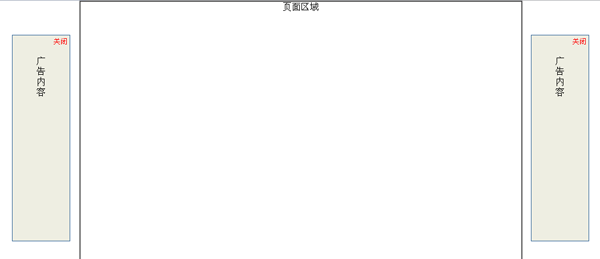
具体代码如下:
<html>
<head>
<title>对联广告</title>
<meta http-equiv="Content-Type" content="text/html; charset=gb2312">
</head>
<body style="margin:0px;">
<div align="center">
<center>
<table border="1" width="776" height="3000" cellspacing="0" cellpadding="0">
<tr>
<td width="100%" valign="top"><div align="center">页面区域</div></td>
</tr>
</table>
</center>
</div>
<SCRIPT LANGUAGE="JavaScript">
<!--
var showad = true;
var Toppx = 60;//上端位置
var AdDivW = 100;//宽度
var AdDivH = 360;//高度
var PageWidth = 800;//这个参数决定是否出现左右滚动条
var MinScreenW = 1024; //显示广告的最小屏幕宽度象素
var ClosebuttonHtml = '<div align="right" style="position: absolute;top:0px;right:0px;margin:2px;padding:2px;z-index:2000;"><a href="javascript:;" onclick="hidead()" style="color:red;text-decoration:none;font-size:12px;">关闭</a></div>'
var AdContentHtml = '<div align="center"><br><br>广<br>告<br>内<br>容</div>';
document.write ('<div id="Javascript.LeftDiv" style="position: absolute;border: 1px solid #336699;background-color:#EEEEE2;z-index:1000;width:'+AdDivW+'px;height:'+AdDivH+'px;top:-1000px;word-break:break-all;display:none;">'+ClosebuttonHtml+'<div>'+AdContentHtml+'</div></div>');
document.write ('<div id="Javascript.RightDiv" style="position: absolute;border: 1px solid #336699;background-color:#EEEEE2;z-index:1000;width:'+AdDivW+'px;height:'+AdDivH+'px;top:-1000px;word-break:break-all;display:none;">'+ClosebuttonHtml+'<div>'+AdContentHtml+'</div></div>');
function scall(){
if(!showad){return;}
if (window.screen.width<MinScreenW){
alert("临时提示:nn显示器分辨率宽度小于"+MinScreenW+",不显示广告");
showad = false;
document.getElementById("Javascript.LeftDiv").style.display="none";
document.getElementById("Javascript.RightDiv").style.display="none";
return;
}
var Borderpx = ((window.screen.width-PageWidth)/2-AdDivW)/2;
document.getElementById("Javascript.LeftDiv").style.display="";
document.getElementById("Javascript.LeftDiv").style.top=document.body.scrollTop+Toppx;
document.getElementById("Javascript.LeftDiv").style.left=document.body.scrollLeft+Borderpx;
document.getElementById("Javascript.RightDiv").style.display="";
document.getElementById("Javascript.RightDiv").style.top=document.body.scrollTop+Toppx;
document.getElementById("Javascript.RightDiv").style.left=document.body.scrollLeft+document.body.clientWidth-document.getElementById("Javascript.RightDiv").offsetWidth-Borderpx;
}
function hidead()
{
showad = false;
document.getElementById("Javascript.LeftDiv").style.display="none";
document.getElementById("Javascript.RightDiv").style.display="none";
}
window.onscroll=scall;
window.onresize=scall;
window.onload=scall;
//-->
</SCRIPT>
</body>
</html>
希望本文所述对大家的JavaScript程序设计有所帮助。