js console.log打印对像与数组用法详解
更新时间:2026-10-06 18:08:37作者:fang
本文实例讲述了js console.log打印对像与数组用法。分享给大家供大家参考,具体如下:
console.log是什么东西,其实就是一个打印js数组和对像的函数而已,就像是php的print_r,var_dump。console.log这个函数本身没什么好说的,这篇博客告诉大家怎么去用这个函数。在说这个函数之前,我想大家用的最多查看js输出,是alert吧,但是alert,只能弹string或者是int的
一、测试文件test.html
<html xmlns="http://www.w3.org/1999/xhtml">
<head>
<meta http-equiv="Content-Type" content="text/html; charset=utf-8" />
<title>console.log test</title>
</head>
<script type="text/javascript">
var testobj =
{
'id': 1,
'content': 'test',
'firstname': function() {
document.getElementById('firstname').value = "zhang";
},
'lastname': function() {
document.getElementById('lastname').value = "ying";
}
};
<!-- 打印对像 -->
console.log(testobj);
</script>
<body>
<input type="text" id='firstname' name="firstname" value=''>
<input type="text" id='lastname' name='lastname' value=''>
</body>
</html>
二、chrome 开发工具查看js对像
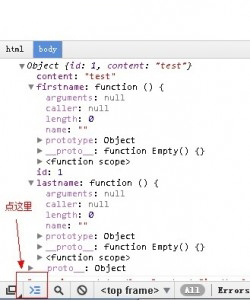
console chrome
现在chrome开发者工具和firebug,我用的时候,一半对一半。chrome开发者工具,还有一个功能,firebug不具有.
控制台可以运行js,如果这个页面是iframe的话,firebug只能运行在父级上面,而chrome可以选择里面的页面执行,如果下图
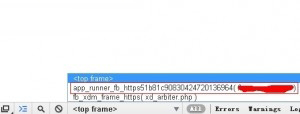
chrome iframe console
三、firebug查看js对像
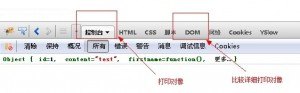
firebug console
希望本文所述对大家JavaScript程序设计有所帮助。